
Information
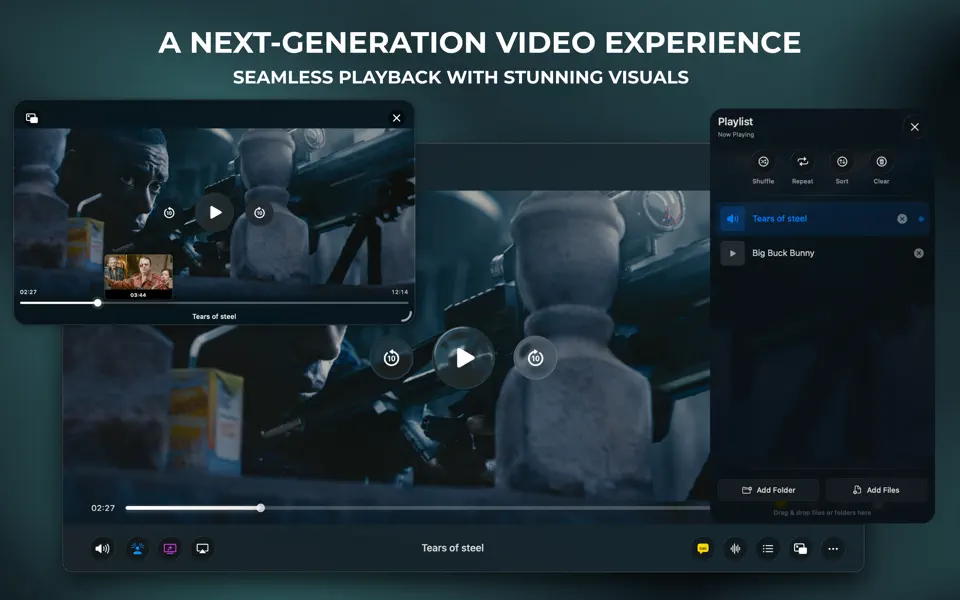

Meet Vidi, the ultimate video player designed exclusively for macOS.
Whether you’re watching a 4K HDR movie, binge-watching a series, or casting content to your TV, Vidi delivers a stunning, stutter-free experience. It combines a beautiful user interface with a powerful playback engine that handles almost any file format you throw at it.
Vidi KEY FEATURES
• Play Anything: Native support for MP4, MKV, AVI, MOV, WebM, and many more. No conversion needed.
• Immersive Ambient Mode: Experience your movies like never before with a dynamic glow effect that extends the video beyond the player frame.
• Cinematic Spatial Audio: Enjoy theater-like surround sound with support for 5.1 and 7.1 audio tracks. Works with ANY pair of headphones.
• Cast to Any Screen: Seamlessly stream your content to AirPlay, Chromecast, and DLNA devices with full playback control.
Vidi POWERFUL PLAYBACK
• Hardware Acceleration: Optimized for Apple Silicon (M1/M2/M3) for silky smooth 4K & 8K playback without draining your battery.
• Advanced Picture-in-Picture: A floating window that actually works, featuring timeline scrubbing, hover previews, and full playback controls.
• Smart Resume: Automatically remembers exactly where you left off in every file.
• Intro/Outro Skipping: Automatically detects and skips opening/closing credits using chapter metadata.
• Variable Speed: Precise playback speed control from 0.25x to 2x.
• Thumbnail Seek Preview: See exactly what scene you are scrubbing to before you let go.
PRO AUDIO SUITE
• Cinema Mode: Instantly boost bass and presence for a movie-theater feel.
• Voice Boost: Three levels of dialogue clarity enhancement so you never miss a word.
• Custom EQ: Full 7-band equalizer for complete audio control.
• Dynamic Sound: Intelligently adjusts audio levels for action scenes vs. quiet moments.
• Volume Boost: Push audio beyond 100% with little to no distortion.
• Preferred Language: Automatically selects your preferred audio track language.
SUBTITLES & CAPTIONS
• Instant Search: Search and download subtitles from OpenSubtitles directly within the player.
• Wide Format Support: Full compatibility with SRT, VTT, ASS, and SSA (advanced anime subtitles).
• Customization: Choose from three styles and four size options to match your viewing preference.
• Preferred Language: Automatically selects your preferred subtitle language.
LIBRARY & MANAGEMENT
• Smart Playlists: Automatically queues the next episode (e.g., Episode 2 plays after Episode 1).
• Intelligent Display: Cleans up messy filenames to show clean Season/Episode info and Movie Titles.
• Auto Playlist: Opens all video files in a folder automatically.
• Playback History: Quick access to your recently watched videos.
• Shuffle & Repeat: Randomize your playlist or loop your favorites.
DESIGNED FOR MAC
• Native Liquid Glass Design: Supports native macOS Tahoe 26 Liquid glass
• Flexible Interface: Choose between Full, Compact, or Minimal control bars to suit your style.
• Gesture Controls: Swipe to seek, scroll to adjust volume.
• Sleep Timer: Fade out and pause playback after 5, 15, 30, 45, or 60 minutes.
• Keyboard Shortcuts: Complete keyboard navigation for power users.
Privacy Policy & Terms of Use: https://www.vidiplayer.com/terms-privacy
—
Promotional images feature content from “Tears of Steel” and “Big Buck Bunny” (© Blender Foundation | www.blender.org). Used under Creative Commons Attribution 3.0.